Cloud Computing Applications: A Guide for Beginners

You may already use cloud computing applications when you check email, save a photo or edit a shared document. The app may look like it lives on your phone or computer, while remote services store, process or sync its information.
That setup can make your files and work available on more than one device. It can also mean you need internet access, a secure account and clear sharing settings. You do not need a technical background to understand the basics or make better choices for yourself or your business.
This guide explains familiar uses, how online services support teams, and what to check before you rely on them. The useful question is not whether an app looks local, but what its remote service does for you.
Key Takeaways
- Cloud apps use remote services to store, process or sync information.
- Your account can help keep files and settings in sync across devices.
- Storage, sync and backup serve different purposes.
- Teams can work from shared documents and business software.
- Internet access, account security and recovery plans still matter.
- Review permissions and expected use before choosing an app.
What Makes an Application Cloud-Based?
A document that updates on both a laptop and a phone is a simple example of cloud computing at work. Remote servers handle some of the app’s storage, processing, sign-in checks, syncing or core logic.
A cloud app can use remote servers while keeping some functions on your device. A locally installed app may do most of its work on one computer, while a cloud app can connect your account to data across devices.
Check whether a file or setting follows your account when you switch devices. That is a practical sign that remote services support the app.
Google Drive is an example of cloud computing because it stores files online and lets you access and share them through an account. Dropbox provides cloud file storage and synchronization, while Salesforce is an online customer relationship management application.

Many apps mix local caching with cloud services. Caching keeps a recent copy on your device, so some features may work offline, but changes might wait to sync.
That limit can matter on a flight, in a basement or during a network outage. An app may open an old file without letting you save changes to the shared version.
A useful first check is whether a file or setting follows your account when you switch devices.
Which Cloud Service Model Fits an Application?
Choose IaaS when you need to configure virtual servers, PaaS when you want to focus on code, and SaaS when you need a finished app. A cloud service model is the layer of cloud resources a provider supplies, from rented infrastructure to a finished online application.
IaaS gives you more control, while SaaS leaves most infrastructure work to the provider. The right model depends on whether you need to manage servers, build software or simply use an application.
| Model | What the user gets | What the provider manages | Example |
|---|---|---|---|
| IaaS | Compute, network and storage resources | Physical infrastructure | AWS |
| PaaS | A managed app development platform | Infrastructure and runtime platform | Google App Engine |
| SaaS | Finished online software | Application and underlying services | Salesforce |
Rent infrastructure when you need more control
IaaS means rented compute, network and storage. You can configure virtual servers and operating systems, while the provider runs the physical hardware and data centers.
In many cases, IaaS uses pay-as-you-go pricing. That can suit a team with unusual needs, but someone must still set up and maintain the software running on those resources.
Use managed platforms or ready-made software
PaaS is a managed development environment for building, running and managing applications. Developers can focus on code rather than maintaining the underlying platform.
Google App Engine is a fully managed PaaS with automatic scaling and no server management for developers. SaaS is different: it gives users a finished application, often through a subscription.
Public, private, hybrid and multicloud describe deployment environments, not service models. Multicloud means using more than one cloud provider, while the other terms describe where infrastructure runs and how it connects.
online fundraising and donor software can be an example of ready-made business software when a group needs donation forms and supporter records.
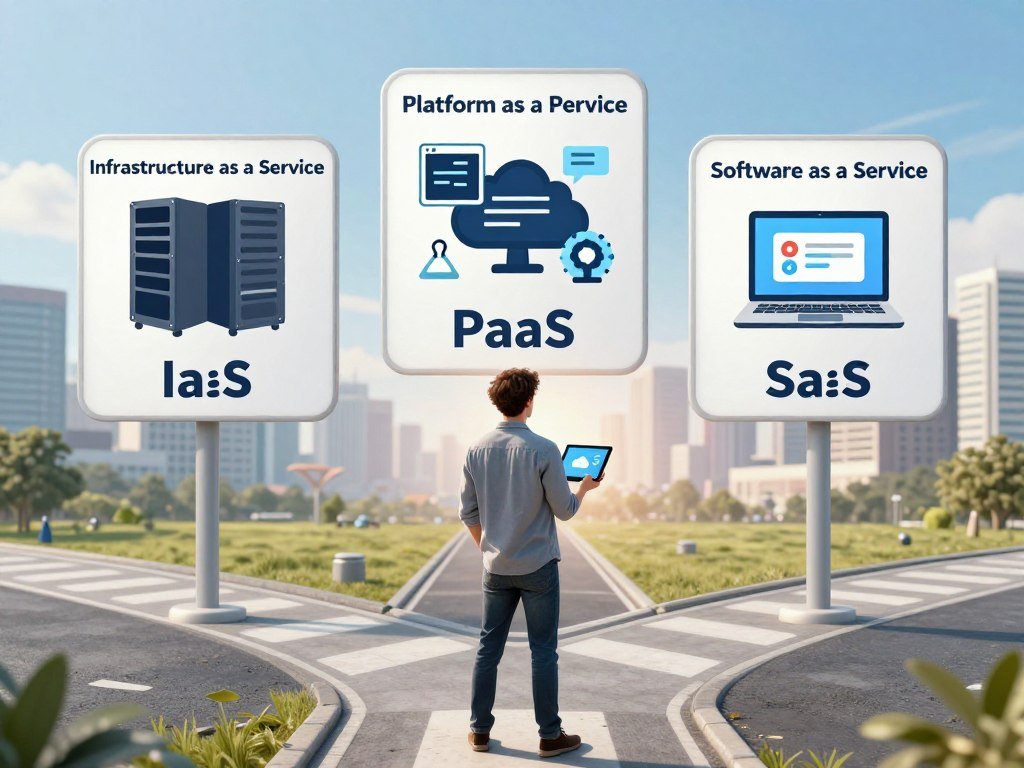
For a first-time user who only needs an application, SaaS usually requires the least infrastructure work.
What Do Cloud Computing Applications Do in Daily Life?
A photo backed up from a phone can still be available after that phone is lost or replaced. Everyday cloud computing applications can keep useful content within reach, though the exact features depend on the app and account.
Storage holds files, sync aligns changes across devices, and backup helps you recover after loss or damage. These jobs can overlap, but one does not always replace the others.
Store, sync and recover personal files
- Email stays synced, so messages can appear on a phone, tablet and computer.
- Google Drive, Dropbox and Microsoft OneDrive store files online and sync changes.
- Photo apps can upload pictures, letting you view them after changing devices.
Cloud storage holds files in a remote account. Sync updates copies across devices, while backup keeps a recovery copy that may preserve older versions.
In 2026, Google accounts included up to 15 GB of storage at no charge. Google One Basic listed 100 GB for $1.99 per month, and Google AI Plus listed 2 TB for $9.99 per month.
Google AI Pro listed 5 TB for $19.99 per month in 2026. Google One plans allowed storage sharing with up to five other people.

Stream, message and stay organized
Netflix streams video from online services instead of requiring you to keep every film on your device. A calendar can sync an appointment, while a messaging app can keep conversations available across devices.
These are cloud computing applications in daily life because remote services send content or keep account data current. They also show that cloud use is not limited to business files.
For real-life examples, think of opening email on a work computer, watching a show on a tablet or checking an updated family calendar on your phone. Each task uses a familiar app connected to remote services.
Before relying on a cloud folder for recovery, check that it has version history or a separate backup.
How Do Cloud Apps Support Teams and Businesses?
A shared project document saves a team from editing several emailed copies of the same file. Cloud apps support collaboration by keeping a shared version available to approved users.
One shared version can reduce confusion, but shared links and permissions need oversight. Team members can edit in real time, leave comments, assign file permissions, chat and hold video meetings.
Microsoft 365 supports cloud-based productivity and collaboration, including shared documents and team tools. A customer relationship management system, or CRM, helps a business track customer details and interactions.
Salesforce provides a cloud-based CRM platform. Teams can use it to work with customer records through an account, rather than keeping separate local copies on each computer.

Azure enterprise integration included Microsoft 365, Active Directory and Windows Server in 2026. That can help an organization connect cloud services with tools and identity systems it already uses.
For business work, the benefit is not just shared access. A team can keep a record of comments, meet online and work from the same system while staff use different devices.
Some online tools also support tasks such as donation forms, donor records and campaign tracking. A team comparing fundraising platforms with CRM features can look for software that fits its current process.
Review who can view, edit and share a team document before sending its link outside the organization.
Where Do Businesses Put Cloud Services to Work?
A development team can create a temporary test environment in the cloud without first buying and setting up physical servers. Cloud computing gives teams access to development platforms and infrastructure that can support changing workloads.
Cloud environments can run test and production systems, automated releases, data analytics and specialized computing tasks. Teams can provision resources for a project, then adjust them as needs change.
Build, test and release software
Developers can create separate test and production environments, run automated deployment workflows and release updates. Kubernetes, which Google open-sourced in 2014, is an example of technology connected with cloud-native development.
Cloud infrastructure can also support software ideas that use pre-trained models or cloud APIs. Founders exploring low-cost machine-learning startup ideas can use cloud tools to test demand before building large systems.
Analyze data and run specialized workloads
Analysts can process structured data, such as sales rows, and unstructured data, such as text or images. Those workloads can support reporting, analytics and artificial intelligence.
AI infrastructure represented 19% of total cloud spending in 2026, compared with 8% in 2023. Gartner projected public cloud end-user spending of $850 billion in 2026, a 21.3% increase from 2025.
A list of cloud computing applications includes ten common tasks: web hosting, email, file storage, backup, streaming, collaboration, video meetings, CRM, ecommerce, and analytics or AI.
- Healthcare teams can support scheduling and access to records.
- Retailers can manage inventory and orders.
- Schools can support education tools and virtual classrooms.
- Finance teams can prepare reports.
- Manufacturers and logistics teams can manage operations.
These examples show ten ways cloud computing can support work, from a public website to an internal data task. Sensitive records need more care than a simple test project.
Keep sensitive records and regulated workloads subject to explicit access, retention and location controls.
Which Cloud Providers Power the Biggest Platforms?
AWS led the global cloud infrastructure services market in Q1 2026, while Google Cloud grew fastest year over year. The three largest providers were AWS, Microsoft Azure and Google Cloud.
AWS held 28% of the market in Q1 2026, while Google Cloud had the highest growth rate among these three. Global cloud infrastructure services revenue reached $129 billion that quarter, up 35% year over year.
| Provider | Q1 2026 global market share | 2026 year-over-year growth |
|---|---|---|
| AWS | 28% | 19% |
| Microsoft Azure | 21% | 40% |
| Google Cloud | 14% | 63% |
Together, the three providers held 63% of the global cloud infrastructure services market in Q1 2026. Their shares and growth rates describe different things: market share shows scale, while growth shows how quickly revenue changed.
AWS is Amazon’s cloud business. Amazon S3 launched in March 2006, and Amazon EC2 launched in August 2006; AWS offered more than 200 products across compute, storage, databases, machine learning, IoT and analytics in 2026.
AWS Bedrock offered managed access to foundation models from Anthropic, Meta, Mistral and other providers in 2026. AWS described Trainium3 as delivering three times the AI training performance of the previous generation.
Azure reached general availability in February 2010. Google App Engine launched in 2008, giving developers an early managed platform for building applications.
In 2026, Jeff Bezos owned 949,180,784 Amazon shares, or 8.82% of Amazon’s outstanding shares. That personal stake does not mean he personally owns AWS as a separate company.
Amazon S3 launched in March 2006, while EC2 followed in August of that year. These dates mark early AWS services, not the launch of every current product.
For an application team, provider fit still depends on the workload, existing tools and operating requirements, not market share alone.
What Do Cloud Applications Cost to Run?
For the same 4-vCPU, 16-GB Linux VM, the listed on-demand hourly prices were almost identical across the three providers. In standard U.S. regions in 2026, AWS and Azure each listed $0.192 per hour, while Google Cloud listed $0.1942.
At 730 hours, estimated monthly compute costs ranged from $140.16 to $141.79. The comparison below uses like-for-like virtual machines, but a real bill can include more than compute.
| Provider | On-demand hourly rate | Estimated monthly cost at 730 hours | One-year commitment hourly rate |
|---|---|---|---|
| AWS | $0.192 | $140.16 | About $0.134 |
| Azure | $0.192 | $140.16 | $0.1317 |
| Google Cloud | $0.1942 | $141.79 | $0.1224 |
Compare a like-for-like virtual machine
On-demand pricing charges for resources as you use them, with no long commitment. A 4-vCPU, 16-GB Linux VM cost comparison gives a useful baseline for compute in standard U.S. regions.
Storage adds a separate charge. In 2026, AWS EBS gp3 cost $0.08 per GB per month, Azure Premium SSD v2 had a $0.113 base rate, and Google Cloud Persistent Disk SSD cost $0.17 per GB per month.
Choose a pricing commitment that fits usage
One-year commitments can lower the hourly rate, but they work best when use stays steady. Spot pricing can cost less for flexible tasks that can stop or restart.
The spot rates in this 2026 comparison were $0.05-$0.07 per hour on AWS, $0.0405 on Azure and $0.066 on Google Cloud. These rates do not suit every workload because spot resources can be interrupted.
AWS pricing covered more than 750 instance types in 2026. AWS Compute Savings Plans could apply across EC2 families, sizes, regions and operating systems, plus eligible Fargate and Lambda use.
EC2 Instance Savings Plans applied within a selected instance family and AWS region in 2026. Azure Hybrid Benefit required qualifying Windows Server or SQL Server licenses; Windows Server licenses also needed active Software Assurance or qualifying subscriptions.
Workload, data transfer, region, operating system and uptime can all change actual bills. Estimate a month from the hours and resources your workload will actually use, then add storage and other metered services.
What Risks Come With Cloud Applications?
A cloud app can be well designed and still be unavailable to you during a network outage or provider incident. Access depends on both your connection and the service’s availability.
Data durability and service uptime measure different things. Durability concerns whether stored data remains intact, while uptime concerns whether a service can be reached.
Check availability and recovery expectations
AWS S3 is designed for 99.999999999% data durability. Standard cloud compute service-level agreements typically specify 99.9%-99.99% monthly uptime, with service credits rather than damages as the remedy.
Service credits are not the same as payment for business losses. A credit may reduce a future bill, but it does not replace lost sales or missed work.
Protect data and plan for provider changes
Account compromise can expose files or let someone change settings. Privacy and regulatory duties also remain with the organization that handles the data, even when a provider runs the service.
Moving data and software to another provider can take time, especially when an app relies on provider-specific tools. Hybrid cloud combines public cloud services with private or on-premises infrastructure, while multicloud uses services from two or more providers.
Scale is large: Synergy Research Group counted more than 1,000 hyperscale data centers in operation worldwide in 2026. Industry trackers counted roughly 11,000 data centers of all sizes, including around 4,000 in the United States.
Those counts do not guarantee that any one service will remain available to you. For critical work, test a recovery process and confirm the service agreement’s uptime remedy before depending on it.
How Can Beginners Choose and Manage Cloud Apps?
Start with the task the app must perform, then check whether its access, recovery and administrative controls fit. Cloud apps can make work easier to reach and scale, but account use can bring recurring costs.
Choose an app that fits the task and has controls you can manage. Advantages of cloud computing include access across devices, rapid scaling, provider-managed maintenance and less need to buy infrastructure up front.
Match the app to the task and controls
- Task fit: check that the app handles the job you need done.
- Offline or internet needs: see what still works without a connection.
- Identity and sharing controls: check sign-in and permission options.
- Recovery options: look for backups, version history or restore tools.
- Total expected usage cost: include subscriptions and likely resource use.
Subscriptions can add up, and unmanaged usage can create costs for resources nobody uses. A small test project can reveal which features matter before a team rolls an app out more widely.
Keep usage visible and reduce waste
Terraform manages infrastructure through code and uses HashiCorp Configuration Language across major cloud providers. Cost-management tools focus on different mixes of visibility, governance and resource changes.
nOps supports AWS, Microsoft Azure and Google Cloud, with a focus on multicloud FinOps and automated cost optimization in 2026. IBM Turbonomic focuses on AI-driven rightsizing, scaling, placement and performance optimization.
Apptio Cloudability focuses on FinOps analytics, including cost allocation, budgeting, forecasting and rightsizing across AWS, Azure and Google Cloud. CloudHealth focuses on enterprise multicloud cost visibility, governance, optimization and reporting across those providers.
These tools can help teams see use, but a beginner can start with a regular review of accounts, permissions and active services. Unused test systems may keep running after a project ends.
Review usage and permissions after the first month so unused resources and overly broad access do not become the default.
Conclusion
Cloud apps put remote storage, processing or software behind familiar screens. They can make information easier to reach and help users work across devices.
That convenience comes with choices about permissions, recovery and usage. A few careful settings can help you avoid sharing too much or relying on a copy that cannot restore a lost file.
Pick one app you already use and review its sync, sharing and recovery settings.
FAQ
What are the top 10 cloud computing tools?
Ten representative cloud computing tools are AWS, Microsoft Azure, Google Cloud, Terraform, Google App Engine, AWS Bedrock, nOps, IBM Turbonomic, Apptio Cloudability and CloudHealth. They are not a ranked list. Some provide cloud infrastructure or development platforms, while others help manage code, AI services or cloud costs. The right tool depends on the job you need to do.
What are some examples of cloud computing apps?
Common examples include email, Google Drive, Dropbox, Netflix, Microsoft 365 and Salesforce. Email can sync messages across devices, while Google Drive and Dropbox store and sync files. Netflix streams video, and Microsoft 365 supports shared work. Salesforce is a cloud-based customer relationship management application used to manage customer information and interactions.
What are the 10 examples of applications?
Ten cloud application examples are web hosting, email, file storage, backup, streaming, collaboration, video meetings, customer relationship management, ecommerce and analytics or AI. Each supports a different task. A small business might use web hosting and ecommerce tools, while a team might rely on video meetings and shared work apps. Some services combine several functions in one account.
What are the top 3 cloud computing services?
AWS, Microsoft Azure and Google Cloud are leading cloud platforms. These are providers, not service models. IaaS supplies rented compute, network and storage; PaaS offers a managed environment for building and running apps; SaaS provides finished online software. Each provider can offer services across several models, so the name alone does not tell you what a product does.
Which company is leading in cloud computing?
AWS led the global cloud infrastructure services market by share in Q1 2026, with 28%. Microsoft Azure held 21%, and Google Cloud held 14%. Among those three, Google Cloud had the fastest year-over-year growth in 2026, at 63%. Market share and growth are different measures, and neither one alone shows which provider best fits a specific application.
Did Jeff Bezos start AWS?
AWS launched in 2006 as a cloud business developed and launched by Amazon. Jeff Bezos founded Amazon, but AWS was an Amazon business rather than a separate company he personally started. Amazon S3 launched in March 2006, followed by EC2 in August. Those services helped establish AWS’s cloud offerings, which later grew to cover many kinds of computing needs.
Who is AWS owned by?
AWS is Amazon’s cloud business. Jeff Bezos’s personal Amazon shareholding does not mean he personally owns AWS. In 2026, Bezos held 949,180,784 Amazon shares, representing 8.82% of Amazon’s outstanding shares. Amazon operates AWS as part of its business, so AWS should not be confused with Bezos’s individual investment in Amazon.
Why does Jeff Bezos only own 8% of Amazon?
In 2026, Jeff Bezos held 949,180,784 shares, or 8.82% of Amazon’s outstanding shares. That figure describes his shareholding, but it does not give one reason for the percentage. An ownership stake can change as shares are bought, sold or issued. The stated figure also does not mean Bezos personally owns AWS as a separate business.
About The Author