Cloud Computing Software: A Beginner’s Guide to Using It
The file-sharing link, streaming movie, or work email you open online may already rely on cloud computing software. It gives users access to tools and computing power without requiring them to own the hardware behind each service. For a small business, that can mean sharing files without setting up an office server. For an individual, it can mean opening the same photos on a phone and laptop.
This guide explains familiar examples, how cloud service models differ, and what you gain or give up when you use them. It also covers costs, security, and a safe way to test a service before relying on it. You do not need to move every file or system at once. A manageable first use can show whether the cloud fits your needs.
A useful first question is whether you need an application ready to use or resources to build and run your own.
Key Takeaways
- Cloud services provide applications, storage, and computing power over a network.
- Deployment models describe where cloud resources run and who uses them.
- IaaS, PaaS, and SaaS differ in how much technology you manage.
- Usage-based costs can rise when resources stay active or transfer data.
- Start with one small task, set a spending limit, and use noncritical data.
What Is Cloud Computing Software?
Cloud computing software lets you use applications, storage, or computing power delivered over the internet rather than hosted only on your device. In plain terms, cloud systems are remote servers and hosted applications that users reach through the internet. You can open a service from a phone, tablet, or computer with a network connection.
Cloud services can include finished applications and the computing resources that power them. Gmail is an email application, Netflix streams video, and online file storage keeps documents available across devices. Collaboration tools let teams edit files or plan work together, while business platforms support tasks such as sales and customer service.
The key practical distinction is whether you are using a finished application or renting resources to run one.
That difference matters because the user may have little to manage in one case and much more in another. A person using Gmail mainly works inside the application. A developer renting computing capacity may need to set up an operating system, install software, and manage access.
Cloud computing also includes services that sit behind the apps people use. A company might rent storage, databases, or servers to build its own customer portal. The customer sees a website, while the business uses hosted resources to run it.
For example, a small shop can use a ready-made sales platform instead of maintaining its own servers. A software team can rent servers and build a custom ordering system. Both use cloud services, but they choose different kinds of tools and take on different work.
Cloud access does not mean that every file or program lives only online. Some apps keep copies on your device for offline use, then sync changes when you reconnect. The service still relies on remote systems to store or process information.
Think of the cloud as a service you reach through a network, not a place inside your computer. The app or resource may feel local, but provider-run systems handle some of its storage or computing work.
Choose a finished application when you need a tool, and rented resources when you need to run or build one. That choice helps you judge how much setup and ongoing management a service will require.
How Does Cloud Computing Work?
Opening a cloud app sends a request across a network to systems running in a provider’s data center. That request may ask to load a file, run code, or save a change. The cloud provider supplies the computing resources and maintains the physical equipment.
The provider’s data centers hold the servers, storage systems, and networking equipment that handle those requests. Your device sends information to those systems, which return a result through the network. The speed you notice can depend on the app, the network, and the distance between you and the service.

Data centers and virtualization
A data center is a building or group of buildings that houses computing equipment. Providers use physical servers to run software, store data, and connect services. They also use networking equipment to move information between servers and users.
Virtualization is software that creates virtual versions of computing resources, such as servers, so physical hardware can be divided and shared. One physical server can host several separate virtual machines, or VMs. Each VM acts like a cloud-based virtual computer with its own operating system and settings.
Virtualization helps providers assign capacity without giving every customer a separate physical server. It can also make it easier to add or remove resources as needs change. The provider manages the underlying equipment, while customers manage the services they rent.
How users connect to cloud services
A browser or mobile app can send a request to a cloud service. Administrators may use a dashboard to create resources and change settings. Developers can use an application programming interface, or API, to request services through software.
The provider receives the request, checks the account and permissions, then assigns the needed resources. The service sends information back to the user’s device. For example, saving a document can send updated data to storage and return a confirmation.
Many cloud systems follow five essential characteristics set out by the National Institute of Standards and Technology in 2011. The NIST cloud definition names each one.
- On-demand self-service lets users request resources without waiting for staff to set them up.
- Broad network access makes services available through common devices and network connections.
- Resource pooling lets a provider serve many customers from shared computing capacity.
- Rapid elasticity lets capacity grow or shrink as demand changes.
- Measured service tracks resource use so providers can report or bill for consumption.
Pooling, elasticity, and metering
Resource pooling means a provider assigns capacity from a shared supply. A business may use more servers during a busy period and fewer when demand falls. Elasticity describes that ability to adjust capacity quickly.
Elasticity does not mean unlimited use at no cost. Metering records use, such as active server hours, storage, or data transfer. Check which resources are metered before leaving a test environment running.
A short test can still use paid resources if a VM stays on overnight. A dashboard may show running resources and recent use, but the person who starts a test should know what remains active. That small check can keep a learning project from growing into an unexpected bill.
Which Cloud Deployment Model Fits Your Needs?
A small team that wants quick access without buying hardware can usually start with a public cloud. The main choice is where the cloud environment runs, who shares its infrastructure, and how much control your organization needs.
Public, private, hybrid, and multicloud describe different ways to arrange cloud environments. They do not tell you which software service you are using. A team can use a finished application or rent computing resources within more than one deployment arrangement.

| Model | Infrastructure arrangement | Who uses it | Common reason to choose it |
|---|---|---|---|
| Public cloud | Provider infrastructure shared by customers | Individuals, teams, and organizations | Quick access without buying hardware |
| Private cloud | Environment dedicated to one organization | One organization | Greater control over a dedicated environment |
| Hybrid cloud | Public and private environments work together | Organizations with mixed needs | Keep some systems private while using public services |
| Multicloud | Services from two or more cloud providers | Teams using multiple providers | Use services that fit different workloads |
Public cloud for shared provider infrastructure
Public cloud resources come from a third-party provider and are supplied over the internet. Customers share the provider’s physical infrastructure, but each customer’s accounts and resources remain separated through software and access controls.
This arrangement can suit a new business that needs a website or test server without buying hardware. The provider operates the data center, and the customer selects and manages the services it uses. Public does not mean that every customer can see your files.
Private cloud for dedicated control
A private cloud is dedicated to one organization. The organization may run it itself or pay a provider to host it. Private does not necessarily mean the equipment sits in your own building.
A hosted private environment can be in a provider’s facility while remaining dedicated to one customer. This model can fit an organization that needs specific control over its environment. It also requires a plan for managing that dedicated setup.
Hybrid cloud for a mix of environments
A hybrid cloud combines public and private environments. A company might keep a system in its private environment while using public cloud capacity for a new service. The setup can connect existing systems with newer ones, but the connections need careful planning.
Hybrid arrangements can help when an organization has both older systems and new projects. They can also add work because teams must manage more than one environment. Clear rules help staff know where applications and data should run.
Multicloud for more than one provider
Multicloud means using cloud services from two or more providers. A company might use one provider for a business application and another for analytics. That is different from hybrid cloud, which combines public and private environments.
Using several providers can give a team access to services that suit distinct needs. It can also make billing, access, and technical support harder to coordinate. A small organization should have a clear reason before it adds another provider.
Choose a deployment arrangement around workload sensitivity, existing systems, and the control your team can realistically manage.
What Do IaaS, PaaS, and SaaS Actually Manage?
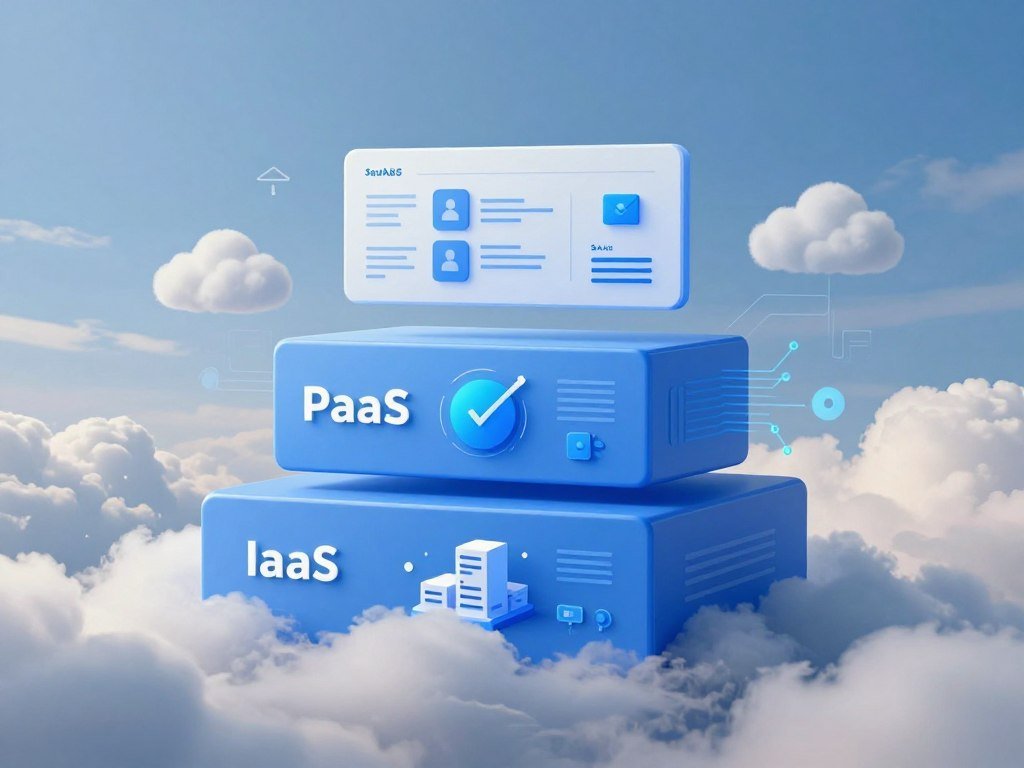
The main difference between IaaS, PaaS, and SaaS is how much of the technology stack the provider operates for you. Think of a stack as the layers needed to run software, from computing hardware to the application people use.
IaaS offers the most control and management work, while SaaS offers the least. PaaS sits between them. The best fit depends on whether you need a finished tool or plan to build and manage an application.
IaaS keeps operating systems in your hands
Infrastructure as a service, or IaaS, supplies computing, storage, and networking on demand. Azure Virtual Machines is one example. You choose a VM and manage its operating system, software, and settings.
The provider runs the physical servers and network. You manage the operating system, runtimes, middleware, and applications. That control can help when an existing program needs a specific setup, but it also leaves more work for your team.
IaaS suits people building or configuring systems who need control over the environment. A small business might rent a VM to host a custom application instead of buying a server. Someone must still maintain the software running on that machine.
PaaS manages the application platform
Platform as a service, or PaaS, gives developers a hosted platform to deploy applications without managing VMs or operating systems. Azure App Service can host web apps, while Azure Functions runs code in response to events.
A PaaS provider manages infrastructure, operating systems, databases, and development tools for the platform. Azure SQL Database is a hosted database service. This setup lets developers focus more on their application and less on the servers beneath it.
PaaS can suit a small team that wants to build a website or service without setting up each server layer. The platform still has rules and limits that developers need to understand. It can also shape how an application is built and deployed.
SaaS delivers a finished application
Software as a service, or SaaS, provides a ready-made online application. Microsoft 365 and Dynamics 365 are examples. The provider maintains the software and its underlying infrastructure, while users work through the app.
SaaS is convenient when you need a tool rather than a system to build. You may manage user accounts, app settings, and the data you enter. The provider handles the application updates and physical systems behind it.
For a small business, a SaaS tool can cover email, document sharing, or customer records without a developer. A business choosing other tools can also compare options for rental management software by the tasks each one supports.
Pick the least management-heavy model that still gives you the control your application requires.
Where Do You Already Use Cloud Applications?
Saving a file to Google Drive or streaming a movie are everyday examples of using cloud applications. You may use them without thinking about where the service stores files or runs software.
Common examples include file storage, photo backup, email, streaming, collaboration suites, and business platforms. Google Drive, Dropbox, and Microsoft OneDrive save and share files. Their apps help you open the same documents from different devices.
Personal services for files and media
Cloud storage can keep a copy of a document online and sync changes across devices. Google Drive, Dropbox, and Microsoft OneDrive are common services for saving and sharing files. Photo backup apps use a similar approach to keep pictures available if you change phones.
Gmail stores email through a hosted service, while Netflix streams video to a connected device. These applications let you access content without keeping every part of the service on your own computer. Some apps also save selected content for offline use.
These examples show why a cloud service can feel ordinary. You open an app, pick a file, or press play. The provider’s systems handle storage, delivery, or processing behind that action.
Workplace apps for collaboration and business
Collaboration suites let coworkers edit documents, share calendars, and hold meetings. A small team can use them without setting up its own email server. Each person signs in with an account, and access settings help control who can open shared work.
Business platforms can manage work such as customer records, sales, accounting, and online orders. Rental companies may use tools for rent collection, leases, repairs, and tenant messages. Compare the features in rental property management platforms when those tasks matter to your business.
Software startups also rely on hosted tools for operations and customer service. A founder choosing business tools can use this software startup launch guide to think through vendor choices alongside the product plan.
Salesforce products for customer operations
Salesforce offers applications for sales, service, marketing, and commerce. A sales team can track customer deals, while a service team can manage support cases. Marketing and commerce apps support customer outreach and online buying.
Salesforce Data 360 unifies data from different sources. MuleSoft provides integration tools and APIs that connect systems. Tableau supports data exploration, while Agentforce provides tools to build and deploy AI agents.
Those products serve different jobs, even when one company uses several of them. Data unification, system connections, visual analysis, and AI agents are distinct needs. Naming the task first helps a team choose a suitable application.
Match a business application to the task it performs, not just to the fact that it is cloud-hosted.
What Advantages Does Cloud Computing Offer?
Cloud services can help a team avoid buying enough hardware for its busiest day and leaving much of it idle at other times. That flexibility can be useful for a shop with holiday demand or a developer testing a new app.
Cloud computing can reduce upfront hardware spending, but it does not guarantee a lower total cost. Pay-for-use pricing can suit demand that rises and falls, while unused resources or poor configurations can erase savings.
- Less upfront hardware spending can leave more cash for other business needs.
- Flexible capacity can grow during busy periods and shrink when demand drops.
- Access from different locations can help users work across devices.
- Managed maintenance can reduce the work of caring for physical servers.
- Development tools can be available faster than setting up local systems.
Access from different locations can help a remote worker open a file or business app from home. A development team can also test an idea without first buying servers. Those gains matter most when the selected service fits the work.
Cloud services may shift spending from large hardware purchases to operating costs that track use. The bill can still include costs for storage, active servers, and data transfer. A resource left running after a test may keep adding charges.
AWS Cost Explorer and Azure Cost Management help users review cloud costs. FinOps is a framework for managing cloud financial operations. These tools and practices can help teams compare spending with project needs.
Cloud computing can also give a small team access to tools it could not easily host itself. Yet a managed service does not remove the need to plan capacity or review bills. Cost savings depend on how much you use and how you configure it.
Compare the expected usage bill with the cost of owning and maintaining the equivalent capacity.
What Should You Know About Cloud Security and Responsibility?
A cloud provider can secure its physical data center, but customers still control important account and data settings. That shared duty means you cannot assume the provider protects every part of your setup.
Customers remain responsible for their data, configurations, identities, users, and access management. The provider manages physical hosts, physical networks, and physical data centers. The exact division of work depends on the service model.
Customer and provider security duties
A provider can maintain the equipment and secure the building, while your team controls who can sign in and what they can change. A mistaken setting can expose information even when the provider’s physical systems work as planned.
Cloud Security Alliance figures for cloud security outages include 29% for insecure interfaces and APIs, 25% for data loss and leakage, and 10% for hardware failure. The numbers point to risks involving both software settings and physical systems.
Security work also matters to companies that build hosted tools. Founders planning a cloud security startup need to consider access controls, data isolation, and how they handle customer information.
Protecting data and access
Use this short checklist to reduce common risks:
- Use strong authentication for accounts, especially for administrators.
- Restrict access so each user gets only the permissions needed for work.
- Protect sensitive data with encryption when it is stored or sent.
- Review configurations and account activity for changes you did not expect.
Strong authentication can include a second sign-in step beyond a password. Access limits matter when a person changes roles or leaves a company. A regular review can catch accounts and permissions that no longer fit the work.
Planning for outages and recovery
Backups and redundancy settings vary by service. A backup stores a copy that can be restored, while redundancy keeps copies or systems available if one fails. Cross-region replication can add cost and may need to be set up explicitly.
A service-level agreement describes service commitments and may exclude some kinds of interruption. It may also require customers to file a claim to request service credits. Read the terms that apply to the service you depend on.
A backup only helps if you can restore the needed files or service. Test that a backup can be restored before relying on it during an outage.
How Much Does Cloud Computing Cost?
A same-size Linux virtual machine in a 2026 standard-U.S.-region comparison cost about $0.19 per hour across AWS, Azure, and Google Cloud. For one specific size, the on-demand rates were $0.192 for AWS and Azure, and $0.1942 for Google Cloud.
These rates compare a Linux VM with 4 vCPUs and 16 GB of memory, not a complete cloud bill. The estimates below assume 730 hours of use and standard U.S. regions in 2026.
| Provider and VM model | On-demand hourly rate | 730-hour estimate | One-year committed hourly rate |
|---|---|---|---|
| AWS m6i.xlarge | $0.192 | $140.16 | About $0.134 |
| Azure D4s v5 | $0.192 | $140.16 | About $0.1317 |
| Google Cloud n2-standard-4 | $0.1942 | $141.79 | About $0.1224 |
The comparison uses the same size and hours for each provider. One-year committed rates can be lower than on-demand rates, but commitments may limit flexibility. Actual bills depend on the resources and terms attached to a workload.
Spot capacity costs less because providers sell spare capacity that can be interrupted. Listed Spot rates were $0.05-$0.07 per hour for AWS, $0.0405 for Azure, and $0.066 for Google Cloud. A job that cannot pause safely may not fit this option.
AWS offers on-demand, Reserved Instance, Savings Plan, and Spot pricing. Savings Plans and Reserved Instances can use one- or three-year terms, while Spot discounts can reach 90% off on-demand prices.
Azure offers pay-as-you-go, reservations, Spot, Hybrid Benefit, Savings Plans, and Dev/test pricing. Azure reservations can use one- or three-year terms. Each program suits different patterns of use, so a lower hourly price does not always mean a lower total bill.
Storage, data transfer, region, support, and utilization can all change total cost. A VM that runs all month has a different cost from one used for a few hours each week. The 2026 VM rate comparison shows why the size and time assumptions matter.
Estimate a real workload by including storage, data transfer, and the time resources will remain active.
Which Free Cloud Services Can Beginners Try?
A free tier can be a practical sandbox for a first cloud experiment, provided you keep track of what is included. Start with a small test, such as a short computing task or a sample dataset.
Free offers have eligibility rules, service limits, and time periods. In January 2026, AWS offered new customers up to $200 in credits and free use of selected services for up to six months.
New Google Cloud customers could receive $300 in Welcome credit for 90 days. No billing applied during the Free Trial, and customers could use credits on eligible products and services.
| Service area | Included monthly or daily usage | Eligibility or limit condition |
|---|---|---|
| Compute and storage | 1 e2-micro instance per month; 5 GB-months of Standard Cloud Storage | Google Cloud Free Tier, eligible customers |
| Analytics and requests | 1 TB of BigQuery queries; 2 million Cloud Run requests per month | Google Cloud Free Tier, eligible customers |
| AI services | 1,000 Vision AI units; 60 minutes of Speech-to-Text per month | Google Cloud Free Tier, eligible customers |
| Build and database storage | 120 Cloud Build minutes per day; 1 GB of Firestore storage | Google Cloud Free Tier, eligible customers |
| Messaging and function invocations | 10 GB of Pub/Sub messages; 2 million Cloud Run functions invocations per month | Google Cloud Free Tier, eligible customers |
Google Cloud Free Tier limits apply to eligible customers and do not expire, but the limits may change. Services included in a free tier can cover a useful test without covering every feature or level of use.
A production workload may need more storage, requests, or computing time than the free limits allow. Credits also have an end date, and a growing test can use them faster than expected. Google Cloud Free Tier limits include specific monthly and daily amounts.
Use a free offer to learn how a service works, not as a promise that a live business system will cost nothing. Read the eligibility and billing terms before moving a test project into production.
How Do AWS, Azure, and Google Cloud Compare?
AWS, Microsoft Azure, and Google Cloud together held 63% of the global cloud infrastructure market in Q1 2026. They are large providers, but market share alone cannot tell you which one fits your project.
The best cloud computing software depends on your existing tools, workload, and required services. AWS is a sensible start when breadth matters, Azure fits teams invested in Microsoft products, and Google Cloud suits analytics or machine-learning work.
AWS for breadth of services
AWS held 28% of the global cloud infrastructure market in Q1 2026. Its services grew 19% year over year in 2026. AWS offered more than 200 cloud products, including Amazon EC2 for computing, Amazon Bedrock for generative AI tools, and SageMaker for machine learning.
AWS can be a sensible starting choice when a project may need many types of services. A beginner could start with one service, then add others as the workload changes. The range can also mean more choices to sort through.
A small team should begin with the service that fits its actual task. A broad catalog does not mean every product belongs in a first project. A simple web app may need only a few services.
Azure for Microsoft integration
Microsoft Azure held 21% of the market in Q1 2026 and grew 40% year over year in 2026. Its offerings include Azure Virtual Machines, Azure App Service, and Azure Functions.
Azure can fit a business that already uses Microsoft products and wants its cloud services to work with familiar tools. Microsoft integration is a practical distinction, especially for teams that manage Microsoft accounts and software already.
Azure also offers tools for running apps and databases. A team can choose a VM for more control or a hosted platform for less server work. The right choice depends on what the application needs.
Google Cloud for analytics and machine learning
Google Cloud held 14% of the market in Q1 2026 and grew 63% year over year in 2026. Its products include Compute Engine, BigQuery, and Google Kubernetes Engine.
Google Cloud can suit projects built around data analytics or machine learning. BigQuery supports data analysis, while Compute Engine provides virtual machines. Google Kubernetes Engine helps teams run software in containers.
For a small project, choose based on the services you will use and the tools your team already knows. Switching providers later can take time, so test the main workload before expanding it.
Compare the services your project will actually use rather than choosing by market share alone.
A provider can be strong in one area and still be a poor fit for a specific system. Your existing accounts, staff skills, and app requirements all shape the practical choice.
How Can You Start Using Cloud Services Safely?
Start with one small, reversible task, such as sharing files or testing a development environment. A narrow test gives you a chance to learn without moving a vital system first.
Plan the task, estimate its use, and test it with noncritical data before expanding. A rushed move can cause downtime, reduced performance, or data loss.
- Name one problem to solve, such as slow file sharing or a hard-to-test app.
- Choose a service and deployment model that match the task.
- Estimate usage and set a spending limit before starting.
- Test with noncritical data and check how the service performs.
- Review results and costs before you expand the work.
Cloud migration planning should check application dependencies, compare on-premises and cloud costs, and assess technical feasibility. A small business may find that one older program relies on another system that must remain in place.
APIs and middleware can connect legacy systems with newer services during phased work. Middleware is software that helps separate systems exchange information. A phased move lets you test those connections before changing more of the business.
Teams also need a clear owner for the test. That person can record what worked, what failed, and which resources stayed active. A short review can reveal a problem before it affects customers.
For a software startup, selecting trustworthy tools can be part of building the service itself. A practical startup planning process can include how cloud vendors support operations and customers.
Expand only after the test meets its performance, security, and budget goals.
What Skills and Careers Can Cloud Computing Lead To?
Cloud computing is both a technology area and a field of work, with roles ranging from cloud engineer to cloud architect. The work varies by team, but it often involves building, securing, or running online systems.
In 2026, the U.S. median total annual salary was $142,000 for cloud computing professionals. The median was $152,000 for cloud engineers and $203,000 for cloud architects.
Those total pay figures include base salary and additional pay. Individual compensation varies by experience, location, and employer. A salary figure is a guide to a broad role, not a promise of what one person will earn.
Cloud work spans engineering, architecture, software development, security, operations, and cost management. Engineers may set up services, while architects plan how systems fit together. Security staff review access and risks, and operations teams keep services working.
Developers build applications that run on cloud resources. Cost management staff review usage and help teams understand spending. Small businesses may combine several of these duties in one role instead of hiring a separate person for each area.
Cloud and DevOps are related, but they are not the same thing. Cloud refers to services and infrastructure. DevOps is a set of practices for building and operating software, and teams often use both together.
Learning can start with basic networking, identity, and access control. A beginner might set up a test VM, review its settings, and learn how its network connection works. Those basics apply across many cloud jobs.
2026 U.S. median total salary figures include base pay and additional pay for each role. The figures can help you compare career paths, but skills and work experience shape an individual’s options.
Start by learning basic networking, access control, and one provider’s core service model before specializing.
Conclusion
Cloud services are easier to approach when you begin with one practical need rather than every available feature. The right first step might be sharing a folder, backing up photos, or testing an application in a separate environment.
Choose a service that solves that need and learn what it will cost as you use it. Check who can access the data and which settings you need to manage. A small test gives you real information without putting an important system at risk.
Choose one small task, set a spending limit, and try it with noncritical data.
FAQ
Which programming language is used in cloud?
No single programming language is required for cloud computing. Python, Java, JavaScript, and Go are common choices, but the best fit depends on the platform and workload. A beginner can start with a language used by a project they want to build. Cloud services also offer tools that let users create or manage resources without writing a full application.
Which is better, cloud or DevOps?
Cloud and DevOps are different categories, so one is not better than the other. Cloud services provide computing resources and infrastructure, while DevOps describes practices for developing and operating software. A team can run software in the cloud and use DevOps practices to test and release changes. Learning either can help you understand how modern software teams work.
Is cloud computing an IT job?
Cloud computing is a technology area, not one job title. Cloud engineers, architects, developers, and security staff can all work with cloud systems. Operations and cost management roles may also involve cloud services. The daily work changes by role, so learning basic networking and access control can help you decide which tasks interest you most.
Will AI replace cloud computing?
No, AI will not replace cloud computing because AI workloads still need computing, storage, and networking. AI tools may automate some cloud operations, such as routine checks or support tasks. People will still need to set goals, review results, and manage systems. The mix of skills may change as tools improve, but cloud resources remain part of running AI services.
Is cloud computing hard to learn?
Basic cloud concepts are approachable, but managing real workloads takes practice. Networking, identity, security, and cost controls can take time to understand. You can build confidence with a small test project and learn one service at a time. Avoid starting with a system that holds important business or personal data while you are still learning.
Can I learn cloud computing in 3 months?
Three months can be enough to learn the fundamentals and complete a small project. You might learn how to create a basic resource, control access, and estimate its use. Three months is not enough to master every provider or specialty. A focused project gives you a better learning goal than trying to study every cloud product at once.
Do you need math for cloud computing?
Basic arithmetic and logical thinking are useful for cloud computing. You may need to estimate resource use, compare costs, or understand how data moves through a system. Advanced math is mainly needed in specialized areas such as machine learning. Many cloud jobs focus more on networking, software, security, and planning than on complex equations.
Is cloud computing declining?
No, cloud computing is not declining: the global cloud infrastructure market reached $129 billion in Q1 2026 and grew 35% year over year. Growth differed by provider, so a rising market does not mean every service grows at the same rate. Businesses continue to use cloud resources for software, storage, and computing tasks. Specific job and product trends can still shift over time.
About The Author