Cloud Computing Infrastructure: A Beginner’s Guide

A file shared online or an app opened in a browser can rely on computers housed far from the person using it. Cloud computing infrastructure helps businesses provide that capacity without owning every physical machine, and it supports the applications and data users depend on.
Servers, storage, networks, and software work together to make those services available. You can rent resources as needs change instead of buying equipment that may sit unused or struggle during busy periods.
This guide explains the basic layers, common choices, costs, and first steps in plain language. You do not need technical experience to follow along or make sense of the terms.
Understanding the basic pieces makes it easier to see what a cloud provider manages and what an organization still needs to decide.
Key Takeaways
- Cloud computing gives you internet access to computing resources without owning the machines.
- Cloud infrastructure includes physical equipment and virtual resources.
- Deployment models describe who shares or controls the environment.
- Service models show how much the provider manages.
- Cost estimates should include computing, storage, performance, and data transfer.
- Organizations still make key choices about access, data, and system design.
What Is Cloud Computing Infrastructure?
Cloud computing infrastructure is the physical and software foundation that lets a user request computing capacity over the internet instead of maintaining the underlying machines. It gives you access to on-demand resources, such as storage and computing power, through a cloud provider.
The provider runs physical servers in data centers and uses virtualization to offer capacity that can grow or shrink. A hypervisor is software that divides a physical server’s computing resources among virtual machines, each of which can run its own operating system.

A request travels from your device through the internet to provider-managed equipment. Provider software assigns resources, and the application uses them to serve a task or store data.
- A user requests a computing resource.
- Provider software allocates the resource.
- An application uses the resource to do its work.
- The resource can be resized or released.
Rent capacity that fits the task, then release it when the work is done.
Cloud computing is the activity of using internet-based services. Cloud infrastructure means the resources that make those services possible, including the provider’s hardware and software.
Renting capacity differs from buying equipment. The provider operates the physical machines, while you request and manage the resources your application needs.
Releasing resources that are no longer needed helps prevent unused capacity from continuing to consume a budget.
Which Components Make Up a Cloud Environment?
A cloud application may use a virtual server for processing, block storage for its database, and a load balancer to distribute incoming traffic. These working parts combine to support an application’s needs.
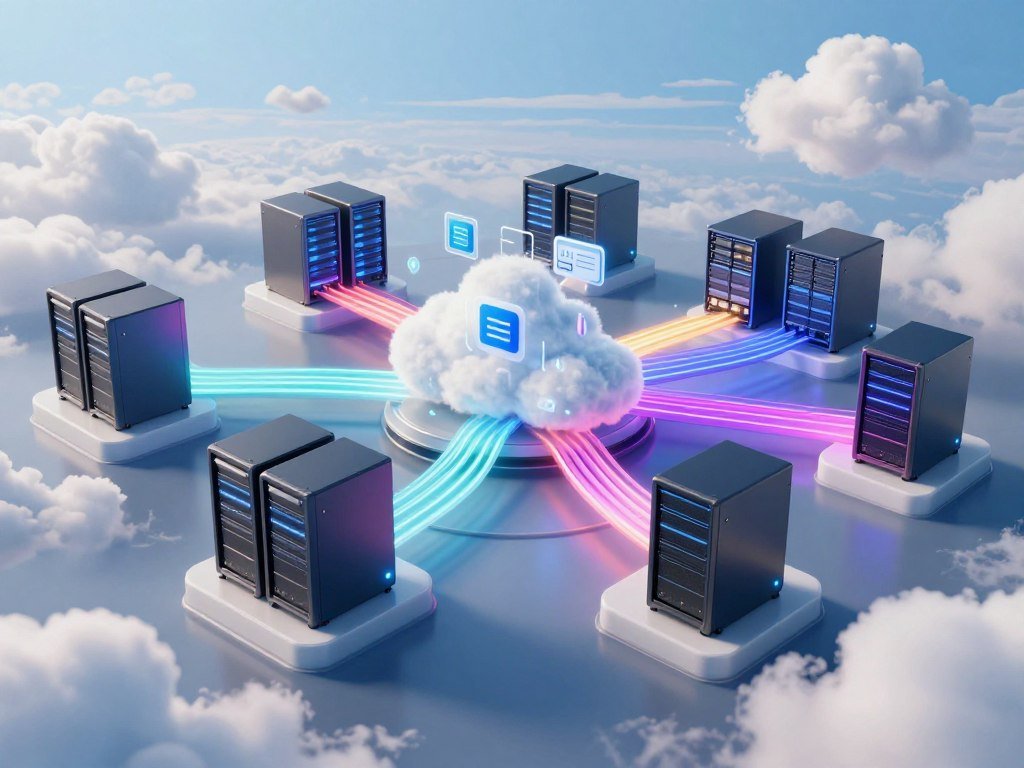
Cloud computing infrastructure examples include servers, storage systems, network equipment, hypervisors, and management tools. Their exact mix depends on the application and the data it handles.
Compute, storage, and networking
Compute resources run software and process information. They can be physical servers, virtual machines, or containers, which package application code with the files it needs.
Object storage works well for collections such as images and backups. Block storage gives a database a virtual disk for frequent reads and writes, while file storage organizes shared files in folders.
Networking moves data between users and resources. Switches, routers, virtual switches, load balancers, and firewalls help direct or filter traffic.
A local area network, or LAN, connects nearby resources. A virtual LAN, or VLAN, divides a network into separate groups, while a wide area network, or WAN, connects locations far apart.
Virtualization and management software
Hypervisors create virtual machines from a physical server’s resources. Containers package code and dependencies, while Kubernetes helps teams deploy and manage groups of containers.
Some applications use microservices, which split a larger application into smaller services that teams can deploy independently. A containerized application can run each service in its own container.
Management software helps teams create resources, track their use, and automate routine tasks. The tools may also show whether a service is healthy or needs attention.
Match each resource to the workload it supports, since a database and a collection of backup images do not need the same storage format.
How Do Cloud Infrastructure, Cloud Computing, and Cloud Architecture Differ?
Two teams can run applications on the same servers and storage yet arrange them into very different systems. Cloud architecture is the design that sets how those parts work together.
Cloud computing means delivering services over the internet. Cloud infrastructure is the physical and virtual resource layer, while architecture is the plan for arranging resources, applications, and data flows.

A house analogy makes the difference easier to see. Computing is living in the house, infrastructure is its materials, and architecture is the blueprint.
Architecture choices shape how applications communicate and where data travels. They also determine how a system responds to a failure or a sudden rise in demand.
One team might place an application and its database together. Another might split the work across services, even when both teams use the same provider and resources.
The NIST cloud computing definition describes cloud services and their key features, including on-demand access and pooled resources.
Use architecture for the design, infrastructure for the resources, and computing for the services being used.
What Are the Main Cloud Deployment Models?
The key deployment choice is whether resources are shared through a provider, dedicated to one organization, or split between those arrangements. The three common models are public cloud, private cloud, and hybrid cloud.
Choose a model based on who operates the environment and who shares its resources. The right fit depends on an organization’s needs for control, staff, and access.

Public cloud shares provider-managed resources
A public cloud is run by a third-party cloud provider, which offers computing, storage, and network resources over the internet. The provider manages the environment and serves many customers.
Each customer uses its own resources and accounts, though the provider’s physical equipment supports multiple customers. This model lets organizations request capacity without running their own data center.
Private cloud dedicates resources to one organization
A private cloud is built, managed, and owned by one organization. It is often hosted in the organization’s data center, but a third party can host it too.
A private cloud gives the organization dedicated resources and more direct control. That control also means the organization must plan how the environment will be run and supported.
Hybrid cloud combines public and private environments
A hybrid cloud combines public and private cloud models. An organization might keep one workload in its private environment and use a public cloud for another.
Multicloud means using services from more than one provider; it does not mean hybrid cloud. Hybrid multicloud combines multiple providers with both public and private environments.
A virtual private cloud is an isolated environment within a public cloud. Despite its name, it is not the same as an organization’s private cloud.
Place sensitive or tightly controlled workloads according to their actual requirements, not simply because one model sounds more secure.
How Do IaaS, PaaS, and SaaS Change What You Manage?
Choosing IaaS, PaaS, or SaaS mainly changes how much of the technology stack your team must operate. As the provider manages more, your team takes on fewer maintenance tasks.
IaaS offers the most direct control, while SaaS gives the provider the broadest management role. PaaS sits between them.
| Model | Provider manages | Customer manages | Typical use |
|---|---|---|---|
| IaaS | Infrastructure | Operating system, applications, data | Configurable virtual server |
| PaaS | Hardware and software platform | Applications and data | Application development environment |
| SaaS | Application stack | Usage and account settings | Google Workspace |
Infrastructure as a service, or IaaS, gives you computing, storage, and networking resources. Your team manages the operating system and the applications running on them.
Platform as a service, or PaaS, provides a managed environment for building and deploying applications. The provider runs the platform, while your team manages its application and data.
Software as a service, or SaaS, provides a managed application. Users work in the software, while the provider manages the underlying application stack.
The B2B SaaS business model includes tools for work such as productivity, sales, and customer support.
An organization may use all three models for different needs, such as a configurable server, a development platform, and business software. Choose the highest-level model that still gives the team the control its application actually requires.
Which Companies Provide Cloud Infrastructure?
AWS, Microsoft Azure, and Google Cloud are three major names to know when comparing public cloud platforms. Other providers include Oracle Cloud and Alibaba Cloud.
In Q2 2026, AWS held 28 percent of the global cloud infrastructure services market, Microsoft held 20 percent, and Google Cloud held 15 percent. Those shares describe market position, not which provider best fits a specific workload.
| Provider | Global market share in Q2 2026 | Q2 2026 revenue | Year-over-year revenue growth |
|---|---|---|---|
| AWS | 28 percent | $42.2 billion | 37 percent |
| Microsoft | 20 percent | $39.3 billion, Intelligent Cloud segment | 32 percent |
| Google Cloud | 15 percent | $24.8 billion | 82 percent |
Global enterprise spending on cloud infrastructure services reached $143 billion in Q2 2026, with market growth of 43 percent year over year.
Each company reports revenue through its own business segments. Microsoft’s Intelligent Cloud revenue, for example, is not an identical measure to AWS or Google Cloud revenue.
These figures can help you recognize the scale of the market, but they do not describe service quality for a particular task. Compare providers against the workload and management needs you identified, rather than choosing by market share alone.
How Much Does Cloud Infrastructure Cost?
A comparable Linux virtual machine with 4 vCPUs and 16 GB of memory cost about $0.19 per hour on demand across AWS, Azure, and Google Cloud in 2026. For that size, the listed on-demand prices were close.
The hourly compute rate is only one part of a cloud bill. Storage, performance, and data transfer can add costs.
Compare on-demand and discounted compute
The comparison below covers a Linux VM with 4 vCPUs and 16 GB of memory in a standard U.S. region in 2026. The monthly totals use 730 hours.
| Provider and VM | On-demand per hour | 730-hour monthly total | One-year committed rate per hour | Spot rate per hour |
|---|---|---|---|---|
| AWS m6i.xlarge | $0.192 | $140.16 | About $0.134 | $0.05-$0.07 |
| Azure D4s v5 | $0.192 | $140.16 | $0.1317 | $0.0405 |
| Google Cloud n2-standard-4 | $0.1942 | $141.79 | $0.1224 | $0.066 |
One-year commitments lower the listed rates by about 30 percent for AWS, 31 percent for Azure, and 37 percent for Google Cloud. AWS Spot rates of $0.05-$0.07 per hour are about 63-75 percent below its on-demand rate.
Azure Spot rates are 79 percent lower, while Google Cloud Spot rates are 66 percent lower. Spot capacity suits work that can pause or restart, not tasks that must stay available.
Include storage and performance in the estimate
| Provider and storage | Storage type | Monthly price |
|---|---|---|
| AWS EBS gp3 | Standard SSD | $0.08 per GB |
| Azure Premium SSD v2 | SSD | $0.113 per GB |
| Google Cloud Persistent Disk SSD | SSD | $0.17 per GB |
| Google Cloud Hyperdisk Balanced | Balanced disk | About $0.084 per GB |
Storage performance can change the bill, since higher provisioned input and output operations per second, or IOPS, can cost extra. Azure Premium SSD v2 base pricing includes 3,000 IOPS and 125 MB/s throughput.
Estimate compute, storage, performance, and data transfer together before treating an hourly rate as a monthly budget.
What Should You Know About Cloud Security and Management?
A cloud provider can secure its physical facilities, but an organization still has to decide who can access its accounts and data. Shared responsibility means both sides have security duties.
The provider protects its infrastructure, while customers make choices about accounts, data, and resource settings. Customer configuration remains important even when the provider operates the data center.
Identity and access management, or IAM, covers user setup, authentication, authorization, and access control. Virtual firewalls filter network traffic, while encryption can protect data at rest and in transit.
- Review IAM permissions.
- Protect data with encryption.
- Filter network traffic with security rules.
- Monitor configurations and backups.
Dashboards and automation can track performance, resource inventory, logs, and costs. The GSA Cloud Information Center’s security guidance explains how duties vary across service models.
For a small organization, routine checks can catch risky settings before they cause trouble. A review of cloud settings, access controls, and backups can also help with ongoing compliance.
Review permissions when people change roles, since access that was once appropriate can become unnecessary.
What Do Organizations Use Cloud Computing For?
Saving a document to an online drive is a simple example of using a cloud service. Cloud computing also supports development, data analysis, and business applications.
Google Drive and Dropbox are familiar tools for storing and sharing files. Online applications do not all use the same infrastructure model behind the scenes.
- Back up files.
- Share documents with coworkers.
- Host an application for users.
- Run analytics on business data.
Development teams can use cloud resources to build and test software without setting up every physical server. Organizations can also use cloud services to study data or run managed business software.
Finance, health care, retail, education, manufacturing, technology, and government all use cloud computing. Their needs differ, from sharing documents to running business applications.
Some companies offer software for business needs such as project management, HR, and financial analysis. See IT business ideas for examples of services and software ventures.
Identify the task first, then decide whether it needs a finished application, a development platform, or configurable infrastructure.
What Does It Take to Learn Cloud Computing and Build a Career?
You can begin learning cloud computing by building networking and operating-system fundamentals before specializing in a provider’s tools. Start with the basics, then practice with small cloud tasks.
A bachelor’s degree and an entry-level certification are a typical path, not a universal hiring rule. Employers also value practical skills and experience.
Start with computing and networking fundamentals
Learn how networks connect devices and how operating systems manage files and programs. Basic scripting and security knowledge will help you automate tasks and reduce common risks.
A typical preparation path includes a bachelor’s degree in computer science, software engineering, or information systems. Some learners add a certification to show they know a provider’s basic tools.
Options include AWS Cloud Practitioner, AWS Solutions Architect Associate, Azure Fundamentals AZ-900, Azure Administrator AZ-104, and GCP Associate Cloud Engineer.
Compare entry-level roles and salary figures
Cloud engineers build and maintain systems. Architects plan them, developers create applications, and administrators manage resources and accounts.
Support specialists help users solve technical problems, while cybersecurity staff protect systems and review risks. Some jobs combine these duties.
As of August 2026, U.S. median total annual salaries were $152,000 for cloud engineers, $203,000 for cloud architects, $142,000 for cloud computing professionals, $133,000 for cloud developers, and $118,000 for cloud administrators.
Glassdoor’s U.S. entry-level cloud computing salary figure was $112,000 per year as of August 2026. Some senior U.S. cloud computing roles had a median total salary of $261,000 per year then.
Pay depends on role, seniority, experience, and location. Learning is manageable when you build skills in sequence, while job stress partly depends on on-call duties and incident responsibility.
Compare job postings for required skills and on-call expectations before choosing a certification path.
How Can You Choose and Adopt Cloud Infrastructure?
A useful cloud decision begins with a list of applications, dependencies, and the resources each one actually consumes. Start with the work, not a provider name.
There is no single provider choice that fits every workload. Compare compatibility, needed control, staff skills, reliability needs, and total cost.
A cloud computing infrastructure tutorial should begin with fundamentals and a small test environment rather than a large migration. A small trial helps you learn how an application behaves before moving more work.
- Inventory applications and their dependencies.
- Match each workload to IaaS, PaaS, SaaS, or an alternative.
- Start with low-risk workloads and move in waves.
- Set budgets and resource ownership tags.
- Establish monitoring for performance, availability, cost, and security before launch.
A workload may fit a managed application, a development platform, or configurable infrastructure. Some work may remain outside the cloud if its requirements make that a better fit.
Keep the people who own each application involved in the plan. They can identify connections and limits that a resource list may not show.
Test the plan on a low-risk workload and verify its performance and full operating cost before expanding it.
For an early product, low-cost machine learning ideas can start with basic hosting and managed tools rather than a large custom setup.
Conclusion
Cloud computing becomes easier to understand when you separate the physical resources from the services and designs built on them. Software makes servers, storage, and networks available in flexible ways, but organizations still choose how to use and manage them.
Good choices fit the workload, the control it needs, and the team’s ability to manage it. A complex design can create extra work when a simpler service would meet the same need.
Start with an application you know. Map the compute, storage, networking, and service model it uses, then notice which parts happen on your device and which depend on remote resources.
FAQ
What is cloud and infra?
Cloud is on-demand access to computing services over the internet, while infrastructure is the physical and virtual foundation behind those services. It includes servers, storage, and networks in provider-run data centers. For example, an online file app may store your documents on remote servers while your device displays them. The app is a service; its supporting equipment and software are infrastructure.
Which cloud job has the highest salary?
Some senior U.S. cloud computing roles had a median total salary of $261,000 per year as of August 2026. The listed median total annual salary for cloud architects was $203,000 in the United States at that time. These figures cover different groups and job levels, so they are not guaranteed pay for a new hire. Role, experience, seniority, and location all affect salary.
What are the main types of cloud computing?
The main service models are IaaS, PaaS, and SaaS, while the common deployment models are public, private, and hybrid. Service models describe how much the provider manages. Deployment models describe how resources are shared or dedicated. A company could use SaaS for email and IaaS for a custom application, then choose a public or private environment for each workload.
Is cloud computing an IT job?
Yes, cloud computing is a broad IT field with jobs in engineering, administration, architecture, development, support, and security. An engineer may maintain cloud resources, while an architect plans how systems fit together. A support specialist helps users, and a cybersecurity worker protects access and data. Many roles involve teamwork across several of these areas.
Will AI replace cloud computing?
No, AI will not replace the computing, storage, and networking infrastructure it needs to run. AI tools can improve cloud services and automate some tasks, such as checking logs or helping manage resources. Those tools still depend on physical servers and networks. Organizations will continue to need people who plan, secure, and manage the systems that support their applications.
What is the basic salary of cloud computing?
Glassdoor’s U.S. entry-level cloud computing salary figure was $112,000 per year as of August 2026. That is a general entry-level figure, not a set salary for every cloud job. A cloud support role and a cloud engineering role may have different pay. Experience, location, employer, and the work you handle can all change your total compensation.
Is cloud computing hard to learn?
Cloud computing is learnable when you build networking, operating-system, and security skills before practicing with provider tools. Start by learning how devices communicate and how programs use files and memory. Then try a small virtual machine or storage service in a test environment. Those basics make provider-specific features easier to understand and use safely.
What degree do I need for cloud computing?
A bachelor’s degree in computer science, software engineering, or information systems is a typical preparation path, but it is not a universal requirement. Some employers value certifications, hands-on work, or related experience. Useful skills include networking, operating systems, scripting, and basic security. Read job postings for the roles you want to see which qualifications those employers ask for.
About The Author